Overview
The System Administrator uses the AI Configuration page to manage the AI features of ClinicalDataS for the whole platform: the connection to the AI service, which AI capabilities are switched on, and the policy that every AI request must pass before any data leaves the platform. Each study then chooses which of the capabilities it uses on its own AI Hub page.
Access this page via System Settings → AI Configuration.
System Administrator Viewing and changing this page require the System Administrator role. For the full permission list, see the Permission Matrix.
Set the AI service connection
The AI Interaction Connection card holds the address and the access key that ClinicalDataS uses to reach its AI service. Only one connection exists for the platform.
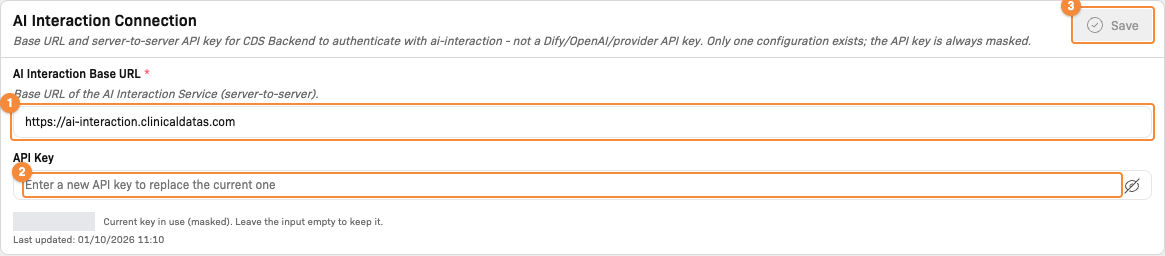
- AI Interaction Base URL
- API Key: enter a new key to replace the current one
- Save is available once a field has changed
| Field | Description |
|---|---|
| AI Interaction Base URL | Address of the AI service. Required; must start with http:// or https://. |
| API Key | Access key of the AI service. The key in use is always shown masked, with the date it was Last updated. Leave the field empty to keep the current key; enter a new key to replace it. "No API key configured yet." is shown until a key is saved. |
- Change AI Interaction Base URL, or enter a new API Key.
- Click Save on the AI Interaction Connection card. Save is available only when a field has changed.
Turn AI capabilities on or off
The AI Capabilities card lists every AI capability of the platform. Each capability card shows its name, a description, an availability tag and a toggle. The toggle decides whether users see the AI button in the corresponding module.

What this should show: the AI Capabilities cards with their availability tags and toggles, and the Per-Capability Policies table below them.
| Availability tag | Meaning |
|---|---|
| Available | The AI service provides the capability. |
| Coming soon | The capability is not yet available. |
| Unavailable | The AI service cannot provide the capability at the moment. |
The availability tag is informational: the System Administrator can switch a capability on or off regardless of its tag. A toggle that is greyed out cannot be changed on this page.
- Switch the toggle of each capability to change.
- Click Save on the AI Capabilities card.
Changes take effect immediately for all users and are written to the audit log. A capability that is switched off here cannot be used in any study. Click Refresh Status to check the availability of each capability again; unsaved toggle changes are discarded.
Set the policy of each capability
The Per-Capability Policies table defines what each capability may send to the AI service. Every AI request is checked against the policy of its capability before it leaves the platform. A capability without its own policy row is not configured and does not receive AI requests.
| Column | Description |
|---|---|
| Capability | Capability name and code |
| PHI Policy | How protected health information (PHI) in the request is handled |
| Allowed File Types | File extensions the capability accepts |
| Max File Size | Largest file the capability accepts |
- Click Edit on the policy row. The Edit Policy dialog opens.
- Select the PHI Policy.
- Select the Allowed File Types and enter the Max File Size (MB).
- Click Save.
| PHI Policy option | Effect |
|---|---|
| MASK_BEFORE_SEND - Mask PHI before sending to the provider | PHI is masked before the request is sent |
| DE_IDENTIFY - Fully de-identify before sending | The request is fully de-identified before it is sent |
| BLOCK_IF_PHI - Block the request if PHI is detected | The request is blocked when PHI is detected |
| ALLOW_WITH_AUDIT - Allow but log a full audit record | The request is sent and a full audit record is kept |
The file types offered in Allowed File Types are the file extensions allowed in System Configuration. Max File Size (MB) must be at least 1 and cannot exceed the maximum file size set there.
Related Docs
- AI Hub — choose the capabilities a study uses
- AI Features
- PHI Management
- System Configuration