Supply Chain Workflow (Randomization mode)
For the business definition of IMP, see IMP in Getting Started. For setup, see IMP Setup — Randomization Mode.
The IMP supply chain tracks investigational product (IP) from creation through subject dispensing and return. A Randomization-mode study is limited to a single investigational product, tracking is fixed to By Unique Serial Number, and dispensing is driven by the subject's randomized treatment arm rather than a manual product selection.
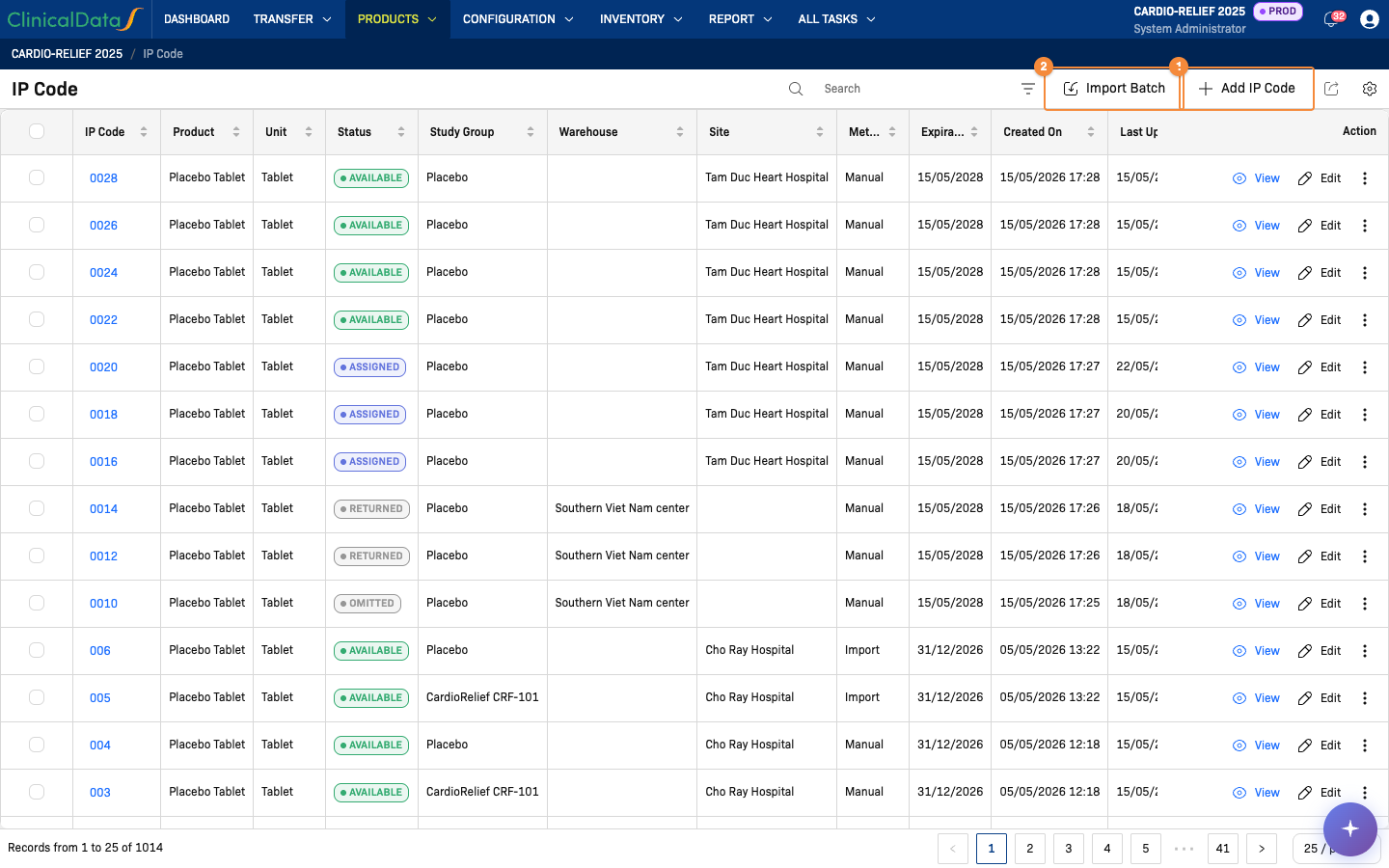
- Add a single IP code
- Import a batch of IP codes from a file
Navigation
| Menu | Sub-item | Purpose |
|---|---|---|
| Transfer | Receipts | Warehouse confirms receipt from the Central Depot — see Receipts |
| Transfer | Delivery to Site | Ship IP kits to a Clinical Research Site, filtered by treatment arm — see Delivery to Site |
| Transfer | Dispenses | Confirm IP dispensed to a subject after randomization and kit assignment — see Dispenses |
| Transfer | Returns | Record unused, expired, damaged, or excess IP returned from a site — see Returns |
| Products | Products | View the study's single product and its barcode |
| Products | IP Code | Add and manage individual IP codes, with Study Group (treatment arm) assignment — see IP Codes |
| Configuration | Warehouses | Central Depot plus intermediate/site pharmacy locations — requires Manage Warehouse = On |
| Configuration | Unit of Measure Category | Product units (e.g., Tablet) |
| Report | Stock by Warehouse, Stock by Site, Move History, Dispensation, Expiry, Damaged | Inventory and movement reporting — see Inventory Warehouse, Inventory Site, Waste Warehouse, Waste Site, Internal Transfer |
| Dashboard | Dashboard | Real-time supply chain analytics and charts — see Dashboard |
Supply Chain Flow
Each movement is a record with its own status, shown on the matching Transfer list:
| Movement | Statuses, in order | Ends early with |
|---|---|---|
| Receipts | Draft → Done | Rejected |
| Delivery to Site | Draft → Prepared → On Delivery → Done | Cancelled — Reject while Draft or Prepared |
| Dispenses | Ready For Dispense → Dispensed | On Hold, Cancelled |
| Returns | Draft → Requested → Approved → Preparing → On Delivery → Received → Closed | Rejected — while Requested |
The two movements with the most steps:
Delivery to Site
Returns
- A delivery moves to Prepared when the sponsor side confirms it, to On Delivery when the warehouse confirms the shipment, and to Done when the site validates receipt. The site's confirmation is its receipt record; there is no separate site receipt step.
- A return created by the sponsor side skips Requested and goes from Draft to Approved. A return received with a shipping error is set to Quarantined instead of Received; both are closed with Verify all detail.
The full sequence, including the setup steps that come before the first movement:
Step 1 — Configuration
  └─ Warehouses: Central Depot + site pharmacies (e.g., Bach Mai Hospital Pharmacy, Cho Ray Hospital Pharmacy)
  └─ Unit of Measure: Tablet

Step 2 — Products
  └─ Single product defined: e.g., CardioRelief CRF-101 50mg Tablet (Randomization mode allows only one product per study)

Step 3 — IP Codes (Products → IP Code)
  └─ Add codes one-by-one or bulk import via CSV
  └─ Assign Study Group at creation (e.g., CardioRelief CRF-101 arm or Placebo arm)
  ⚠️  Unblinded operation — visible to unblinded roles only

Step 4 — Receipts: Central Depot → Warehouse  [Manage Warehouse = ON only]
  └─ Sponsor ships from Central Depot to an intermediate Warehouse
  └─ Warehouse confirms receipt (Transfer → Receipts), selecting kits per treatment arm

Step 5 — Delivery to Site (Transfer → Delivery to Site)
  Two request types:
  └─ Sponsor-initiated: Sponsor selects a warehouse → ships to site
  └─ Site-initiated: Site Pharmacist requests → Sponsor approves + assigns warehouse → ships to site
  [Manage Warehouse = OFF: source is the Central Depot directly]

Step 6 — Dispenses (Transfer → Dispenses)
  └─ Subject completes randomization → Site Pharmacist generates and confirms the dispense from the subject's event

Step 7 — Returns (Transfer → Returns)
  └─ Site records unused, expired, damaged, or excess IP returned
Is the Supply Chain function enabled?
- Yes — activates the Delivery Request workflow (Transfer → Delivery to Site). Two request types are available:
- Sponsor-initiated: Sponsor selects a warehouse and creates a delivery to a site.
- Site-initiated: Site Pharmacist requests a delivery → Sponsor reviews, approves, and assigns the source warehouse.
- No — the Transfer section is not available; supply chain operations are disabled.
Manage Warehouse (in IMP Setup)
- On — 3-tier flow: Central Depot → Warehouse → Site Pharmacy. The intermediate Receipts step is required before IP codes can be delivered to sites.
- Off — 2-tier flow: Central Depot → Site Pharmacy directly. The Receipts step does not apply.
Design vs Production mode
The IMP app header shows Design and Production toggle buttons:
- Design — configuration changes allowed; no real supply transactions
- Production — live operational mode; IP codes and transfers are real
Configure all settings in Design mode before switching to Production.
Prerequisites
Before adding IP codes:
- The Randomization module is fully configured (treatment arms, randomization algorithm, study group parameters) — see IMP Setup — Randomization Mode.
- Exactly one product is defined under Products → Products (Randomization mode allows only one).
- At least one warehouse is defined under Configuration → Warehouses, when Manage Warehouse is on.
- Units of measure are defined under Configuration → Unit of Measure Category.
Studies using PSP mode instead: For PSP Study — Supply Chain Workflow